
Hi!
I am on a strike!
This time we are divning into haproxy and how to make a HighAvilable cluster with HA proxy
We start of with the big steps.
- Install OS (ubuntu in mine case)
- Configure HA cluster with keepalived
- Install haproxy
- Test
Goal
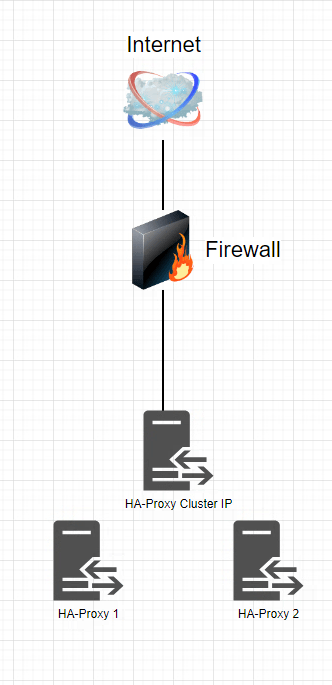
I wanted a proxy soloution that hade failover, so I can patch things when I needed. Below is a picture of this small soloution
OS installation
Won’t go over installation of the OS. Install the os that you like and support HAproxy. Do not create a user named proxy or haproxy.
HA function on ubuntu with keepalived
To install keepalived
sudo apt-get install keepalived, this is done on both nodes.sudo vim /etc/keepalived/keepalived.confThe keeplive config on both nodes with the check of running haproxy:

In code:
# keepalived.conf generated for haproxy-1
vrrp_script chk_haproxy {
  script "killall -0 haproxy"  # check the haproxy process
  timeout 1
  interval 2  # every 2 seconds
  weight 2  # add 2 points if OK
}

vrrp_instance V0 {
        interface ens160
        state MASTER
        virtual_router_id 1
        priority 100
        # use_vmac
        # vmac_xmit_base
        virtual_ipaddress {
            172.20.40.112/24

        }
        track_script {
            chk_haproxy
        }
}
Test ha function
Here I rebooted every node one at a time and I did not loose any ping!

HA proxy config
This is just a test so this config is not complete, just to test the function of HA
What I can say if you want support for more than 1 certificate you can specify a file and in that file you set the certs that you want to load.
#haproxy
global
log /dev/log local0
chroot /var/lib/haproxy
stats socket /run/haproxy/admin.sock mode 660 level admin expose-fd listeners
stats timeout 30s
user haproxy
group haproxy
daemon
ssl-default-bind-ciphers ECDHE-ECDSA-AES128-GCM-SHA256:ECDHE-RSA-AES128-GCM-SHA256:ECDHE-ECDSA-AES256-GCM-SHA384:ECDHE-RSA-AES256-GCM-SHA384:ECDHE-ECDSA-CHACHA20-POLY1305:ECDHE-RSA-CHACHA20-POLY1305:DHE-RSA-AES128-GCM-SHA256:DHE-RSA-AES256-GCM-SHA384
ssl-default-bind-ciphersuites TLS_AES_128_GCM_SHA256:TLS_AES_256_GCM_SHA384:TLS_CHACHA20_POLY1305_SHA256
tune.bufsize 16384
maxconn 50000
defaults
log global
mode http
option httplog
option dontlognull
option forwardfor header X-Client-IP
timeout connect 360s
timeout client 360s
timeout server 360s
timeout tunnel 24h
maxconn 50000
errorfile 400 /etc/haproxy/errors/400.http
errorfile 403 /etc/haproxy/errors/403.http
errorfile 408 /etc/haproxy/errors/408.http
errorfile 500 /etc/haproxy/errors/500.http
errorfile 502 /etc/haproxy/errors/502.http
errorfile 503 /etc/haproxy/errors/503.http
errorfile 504 /etc/haproxy/errors/504.http
frontend http-https
bind 0.0.0.0:80
bind 0.0.0.0:443 ssl crt-list /etc/haproxy/certs/certs.txt
# ACL for Stats page
acl url_stats path_beg /hapee-stats
# serve the stats page if the URL starts with /hapee-stats
use_backend be_stats if url_stats
#Rules
use_backend invid if { hdr(host) -i online.invid.eu }
# backend dedicated to serve the statistics page
backend be_stats
stats uri /hapee-stats
backend invid
balance roundrobin
server invid1 online.invid.eu:443 ssl verify none check
server invid2 socat.invid.eu:443 ssl verify none check

Test
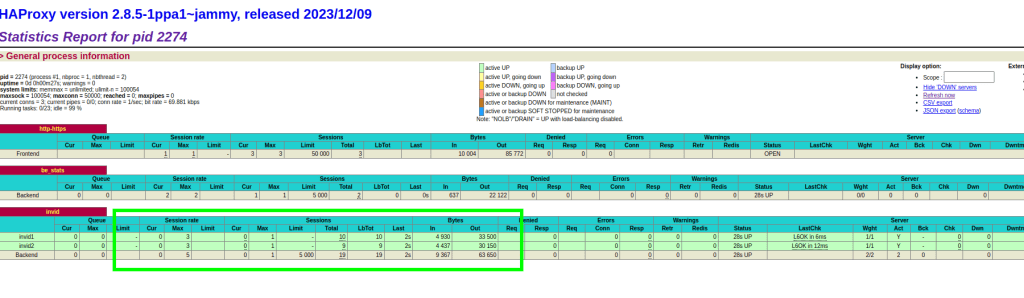
On the status page we can se both server are receiving data
Shut down one of backend servers and still working

Stop haproxy on one node still working

There is a lot of things you can do with haproxy! You can use it as a waf and tcp proxy. Next ting to test if time is with me.
That was all for now!
Keep hacking
//Roger
 Tips and Tricks
Leave a comment