
In the affected scenario:
- The upgrade from v12 to v13 completes without errors
- All Veeam services start and run normally
- Proxy servers are online and show no warnings or errors
- Both existing and newly created jobs fail
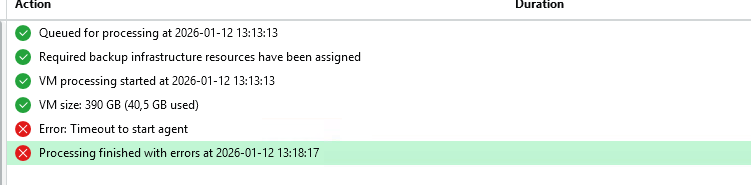
Despite everything looking healthy, every job fails with the same error:
Timeout to start Agent
This can be confusing, as there are no clear indicators pointing to the root cause.
Root Cause
The issue is related to a configuration setting that controls TLS behavior for Veeam Agents. After the upgrade, this setting may be enabled in a way that prevents agents from starting correctly.
Fix / Workaround
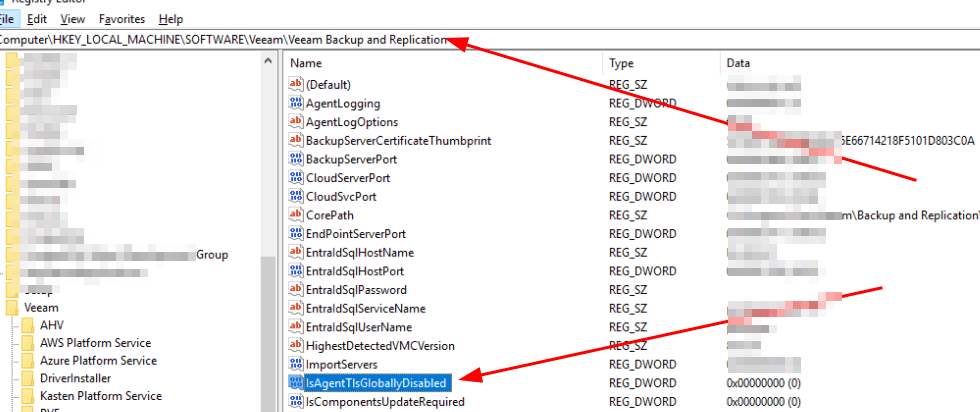
To resolve the issue, disable the global TLS restriction for agents by setting the following value:
IsAgentTlsGloballyDisable = 0
Once this value is set correctly, agent-based communication resumes normally and backup jobs start and run as expected.
Final Notes
- This issue can affect all jobs, not just specific workloads
- It may occur even in environments that were stable on v12
- Always validate backup jobs after upgrading, even if the upgrade itself reports success
Hopefully this saves you some troubleshooting time if you encounter agent timeouts after upgrading to Veeam Backup & Replication v13.
No need to reboot, just restart the job
That was an easy one, but hard to find!
Keep hacking!
//Roger
 Tips and Tricks
Leave a comment